GitFlow
Gitflow 是另一种 Git 分支模型,它涉及使用功能分支和多个主分支。
brew install git-flow-avh
apt-get install git-flow
wget -q -O - --no-check-certificate https://raw.github.com/petervanderdoes/gitflow-avh/develop/contrib/gitflow-installer.sh install stable | bash

仓库初始化
这个工作流不是一个 main 分支,而是使用两个分支来记录项目的历史。该 main 分支存储官方发布历史,该 develop 分支用作功能的集成分支。 main 使用版本号标记分支中的所有提交也很方便。
- 第一步是
main用一个develop分支来补充默认值。一种简单的方法是让开发人员在develop本地创建一个空分支并将其推送到服务器:
git branch develop
git push -u origin develop
这个分支将包含项目的完整历史,而 main 将包含一个删节版本。其他开发人员现在应该克隆中央存储库并为 develop。
- 使用 git-flow 扩展库时,在现有 repo 上执行将创建分支:
git flow init develop

# 基于 develop 分支生成新分支 feature/<name>,并切到该分支
=======
```bash

git flow init -f

Branch name for production releases: [main]
Branch name for "next release" development: [develop]

How to name your supporting branch prefixes?
Feature branches? [feature/]
Release branches? [release/]
Hotfix branches? [hotfix/]
Support branches? [support/]
Version tag prefix? []

git branch
* develop
 main
master 分支名: master development 分支名: develop feature 分支名:feature release 分支名:release hotfix 分支名:hotfix support 分支名:support version 标签前缀:v
开发
每个新功能都应该驻留在自己的分支中,可以将其推送到中央存储库 以进行备份/协作。
但是,分支不是从 分支出来,而是 main 用作 feature 它们 develop 的父分支。当一个特性完成时,它会被合并回 develop 。特性不应该直接与 main。
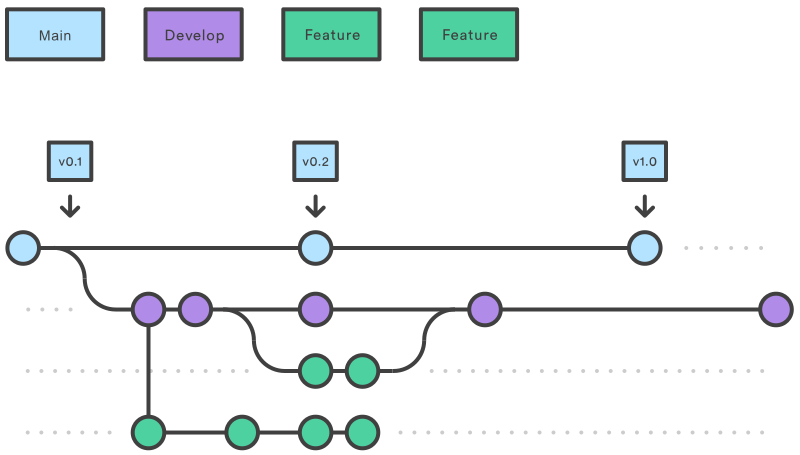
- 执行下面命令
git flow feature start <name>
建立当前任务的 feature ,如 git flow feature start aa_login,即建立一个分支名为 feature/aa_login,并切到该分支。
git checkout -b feature/<name> develop
在
feature分支进行开发,如需调试,可push到远端git flow feature finish
<name>结束feature分支,并merge至develop
新版本的 gitflow 只要 finish 之后自动合并到 develop
检查当前 feature 和 develop 分支是否有冲突,有则提示解决冲突,没有则继续以下流程:
git checkout develop
- 切换到
develop分支
git merge --no-ff feature/<name>
merge feature/<name>
git branch -d feature/<name>
git push 上传 develop 分支
修复
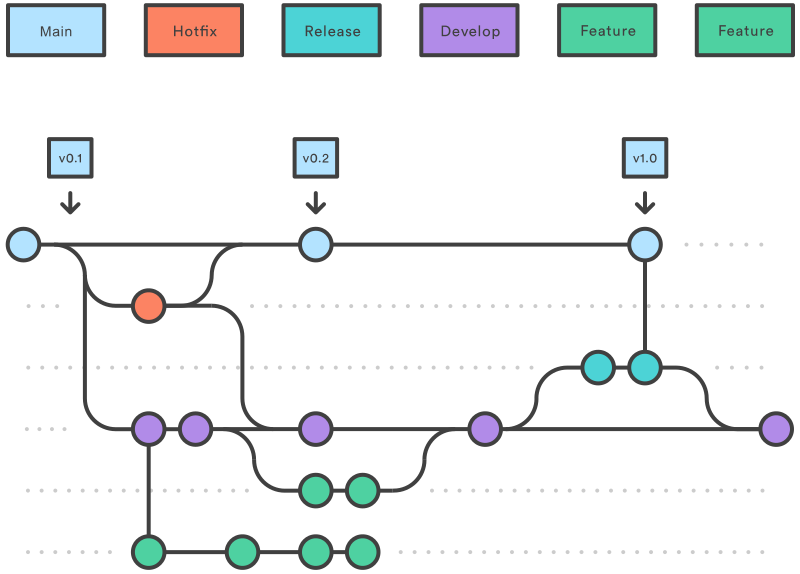
> git flow hotfix start 1.9
Switched to a new branch 'hotfix/1.9'

Summary of actions:
- A new branch 'hotfix/1.9' was created, based on 'main'
- You are now on branch 'hotfix/1.9'

Follow-up actions:
- Bump the version number now!
- Start committing your hot fixes
- When done, run:

git flow hotfix finish '1.9'
git flow hotfix finish 1.9
Switched to branch 'main'
Your branch is up-to-date with 'origin/main'.
Merge made by the 'recursive' strategy.
 c | 2 +-
 1 file changed, 1 insertion(+), 1 deletion(-)
Switched to branch 'develop'
Your branch is up-to-date with 'origin/develop'.
Merge made by the 'recursive' strategy.
 c | 2 +-
 1 file changed, 1 insertion(+), 1 deletion(-)
Deleted branch hotfix/1.9 (was 83e4746).

Summary of actions:
- Latest objects have been fetched from 'origin'
- Hotfix branch has been merged into 'main'
- The hotfix was tagged 'v1.9'
- Hotfix branch has been back-merged into 'develop'
- Hotfix branch 'hotfix/1.9' has been deleted
git flow hotfix start <name>
基于 master 分支 新建分支 hotfix/<name>
在该分支上进行 hotfix
git flow hotfix finish <name>
结束 hotfix 分支,并 merge 到 master 分支和 develop 分支
具体操作:
  git checkout main
  git checkout -b hotfix_branch
  git checkout develop
  git merge hotfix_branch
  git checkout main
  git merge hotfix_branch
上传 master 分支的修改
git checkout develop
git push
上传 develop 分支的修改
- 一个
develop分支是从创建的main - 一个
release分支是从创建的develop Feature分支是从创建的develop- 当
feature完成时,它被合并到develop分支中 - 当
release分支完成后,它被合并到develop和main - 如果
main检测到问题,hotfix则创建一个分支main - 一旦
hotfix完成,它就会合并到两者develop和main